Get customers from the Wink You app
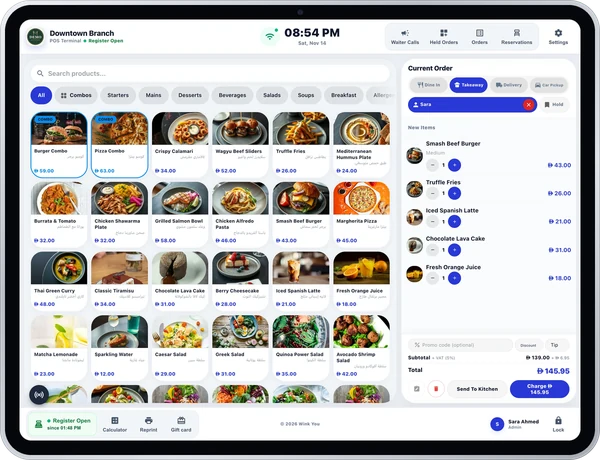
Your place is listed in the Wink You app. People buy your items as a gift for a friend, or order for themselves, and collect at your counter. You keep your own till.
The Wink You app opens soon. Places that join now are set up first, so they are in the app from the day it opens.
What is it?
A way to sell through the Wink You app without changing how you run your place. Orders and gifts arrive already paid, on a separate counter screen.
Who is it for?
Cafes, restaurants, bakeries and sweet shops that want to keep the till they already have.
What do you get?
- The Merchant app for your counter, with a chime for each new order.
- How many minutes away the customer is, and which car to look for.
- Wink You sales in Business Admin: every order and gift, your statements and your payouts.
What do you need?
- A phone or tablet with a browser and an internet connection. Our handheld with a label printer is optional.
- Your current till stays exactly as it is.
- To be paid: a bank account, a letter from your bank showing the IBAN, and your trade licence.
How do customers reach you?
They find your place in the Wink You app, pay inside the app, and come to your counter, on foot or by car.
How do you get paid?
- Customers pay Wink You in the app. Wink You pays you by bank transfer, after its commission, with a statement.
- Payouts start once your bank details are approved. There is no cash to handle, and the card fees on app orders are paid by Wink You.
What does it cost?
- No monthly plan. A commission on the orders and gifts you serve, agreed with you before you sign.
- Your agreement also shows any payout fee and the minimum payout.
What does your team see?
- A new order rings and appears in the list with its number, its items and any notes. Your team hands it over and taps Served.
- When it gets busy, they can pause new orders or mark an item as sold out.
Does it work in Arabic?
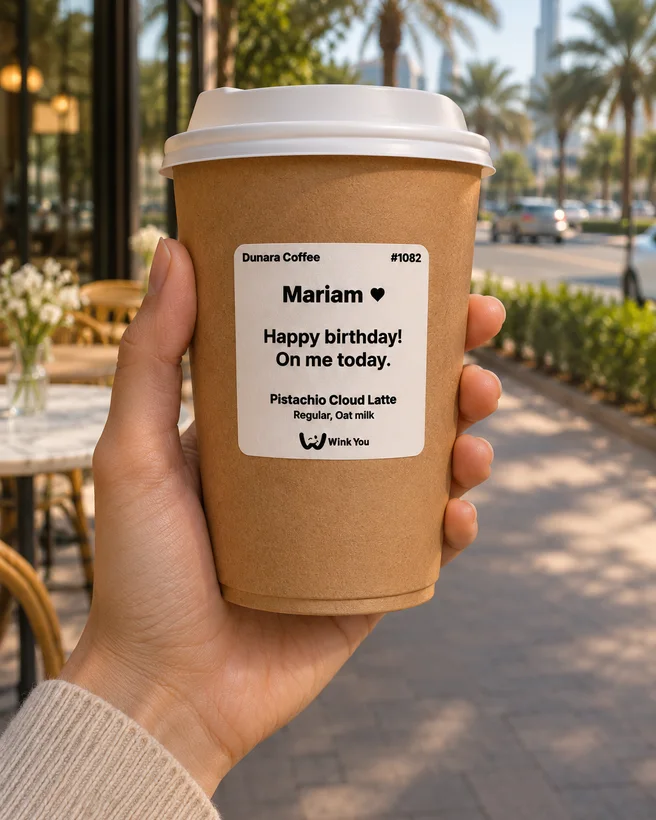
Yes. The Merchant app works in Arabic and English, and the cup label can show the gift message and the name it is for.
What happens after you apply
- Send the short request: your place, where it is, how you take orders, and your mobile.
- Our team calls you on that number to agree your items and terms.
- We set up your place and send you a pairing code.
- Open the Merchant app on your phone, tablet or handheld, enter the code and your branch PIN.
- In Business Admin, add your bank account and sign the Wink You sales agreement, so payouts can start.