Wink Admin

Business Admin: every branch in one place

Update menus, prices, settings, and permissions from your browser or phone, with an assistant for everyday tasks.

Get the Wink You Business app

Download Wink You Business on the App StoreGet Wink You Business on Google Play
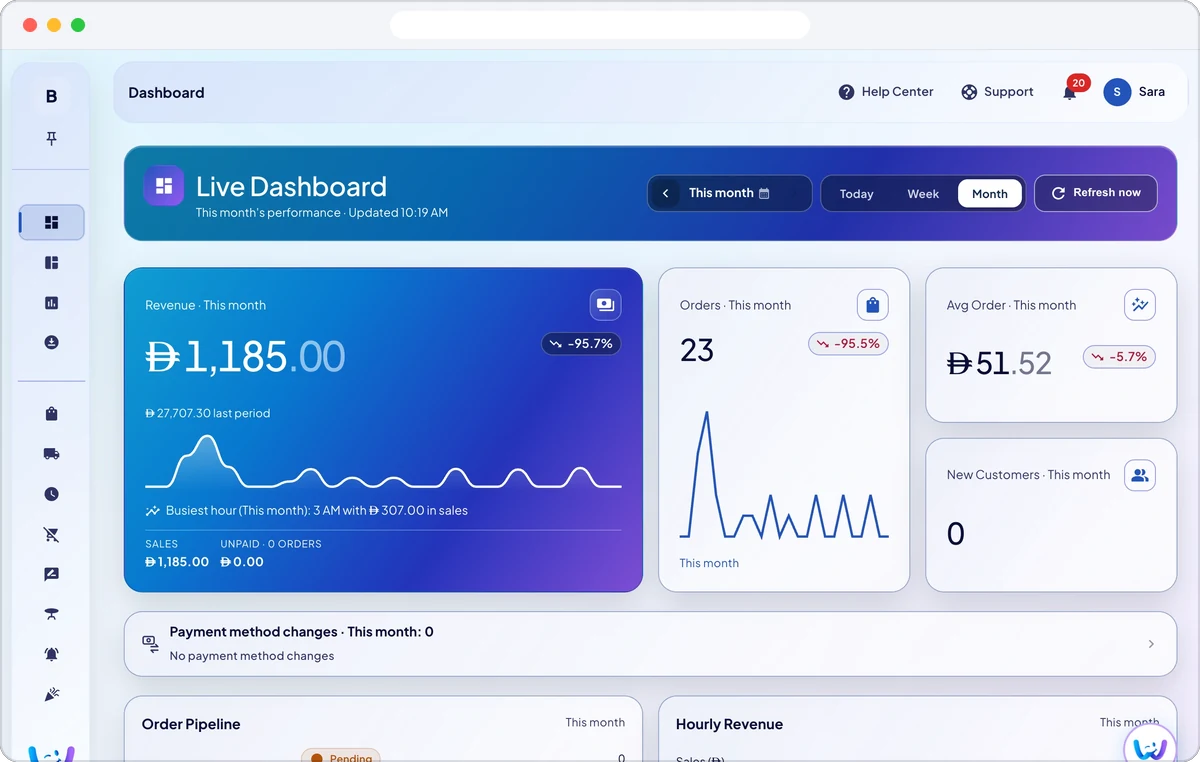
The live dashboard in Business Admin for this month, showing revenue with a sales chart, the number of orders and the average order value.
Available on
  • Web browser
  • iPhone and iPad
  • Android

Priced by branches and usage. See pricing for what each plan includes.

Wink Admin is where owners and managers run the business. It is where the catalogue is edited, branches are added and configured, staff get their roles and permissions, and every setting for every other product is turned on. It ships as a web app and as apps built for iPhone and Android that carry the same screens, and it includes an assistant you can ask in plain language to make a change, which then shows you exactly what it is about to write before it writes it.

What you get

  • Web, iPhone and Android, with the same screens on all three.
  • Many branches under one account, each with its own prices and hours.
  • Roles and permissions, so a cashier cannot open the reports.
  • Ask the assistant to make a change and confirm it before it happens.
  • Every sensitive action is written to an activity record with a name on it.
An owner office at blue hour, a laptop and tablet closed on a desk by a city window.

How it works

Many branches, one account

Add branches and switch between them from the header. Each branch has its own prices, opening hours, stock, POS counters and staff, and can even sell in another currency with its own branch prices. A branch manager sees and changes only their own branch.

Roles, two step sign in and passkeys

Roles and permissions decide what each person can open, down to single actions such as refunds or price changes. Accounts can use two step sign in and passkeys, trusted devices can be signed out, and sensitive actions are written to an activity record with the name of whoever did them.

An assistant that confirms before it writes

Ask the assistant in plain language to find a screen, create a discount from a description, adjust stock, or look up a gift card or a purchase order. Anything it is about to change is shown to you first and happens only when you confirm, and it can suggest product descriptions you choose to apply.

Food safety checklists and inspections

Log opening, closing, temperature and cleaning checks per branch, with a reading for each item such as a fridge temperature, and keep health inspection reports and equipment maintenance requests in the same place.

The Wink You Business app

Run the business from your phone with the Wink You Business app for iPhone and Android: sales and the dashboard, orders and refunds, menu and prices, stock and purchasing, customers and loyalty, reservations, staff and accounting, on the same screens as the web.

Everything in Wink Admin, all 63

Branch setup

  • Branch records with address and contact
  • Opening hours per branch
  • Branch profile pages
  • Branch settings for branch managers
  • Branch switcher in the admin header

What varies by branch

  • Product availability toggled per branch
  • Per-branch pricing
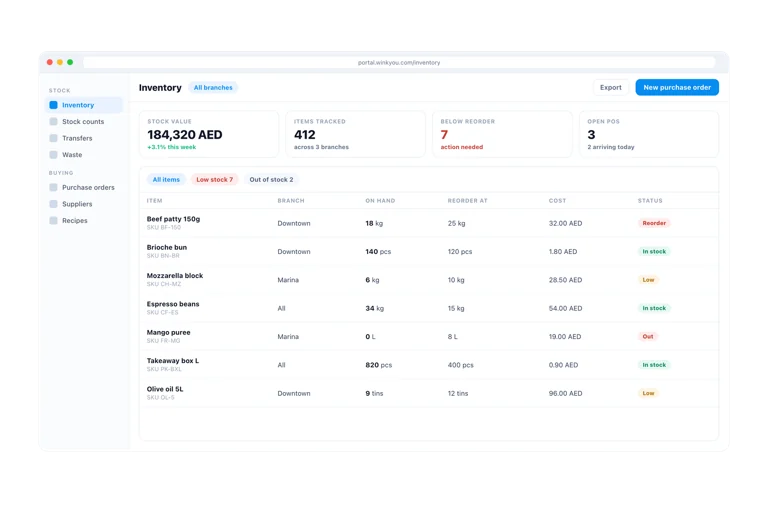
  • Separate stock levels and transfers
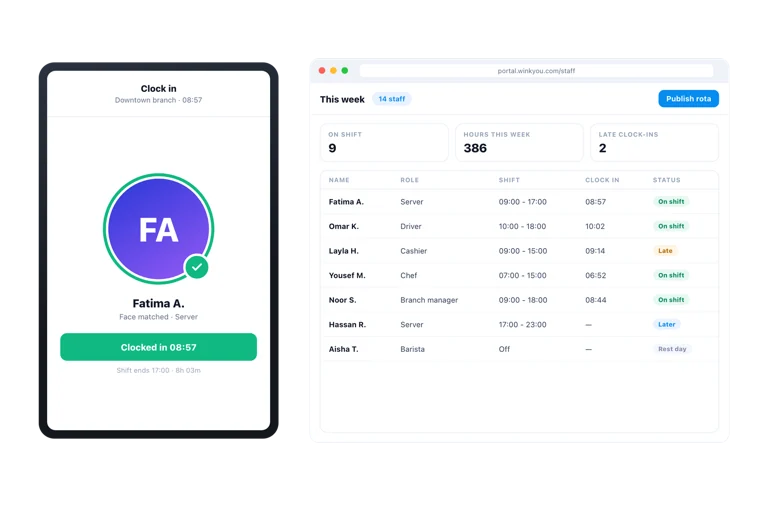
  • Staff assignment and shifts per branch
  • POS counters per branch
  • Branch level announcements
  • A branch selector on the QR menu

Account security

  • Two-step sign-in
  • Trusted device list you can revoke
  • Passkey sign-in for staff
  • Sign-in details kept in the system, not inside access codes
  • Access codes replaced after each use, with repeat use detected
  • Automatic sign-out when sensitive screens are left unused
  • Checks to stop automated form submissions
  • Security alert emails

Separate business data

  • Only your business’s records can be accessed
  • Stored records are protected separately for each business
  • Private storage for personal and biometric files, such as face verification photos
  • Temporary access links shared only after checking permissions
  • Payment provider access details stored in encrypted form

Accountability and compliance

  • Activity record across the whole back office
  • Void and refund alerts to the owner
  • Food safety checklists
  • Health inspection reports
  • Equipment and maintenance request records
  • A public status page with uptime and incidents

Business Admin for iPhone

  • Dashboard, analytics and sales detail
  • Orders, payments and refunds
  • Menu, modifiers, combos and happy hour
  • Inventory, stock quick add and procurement
  • Customers, discounts, gift cards, loyalty and stories
  • Reservations, registers, POS counters and team ops
  • Accounting and finance screens
  • Shop screens: brands, collections, coupons, shipping, returns
  • Media library, activity record, billing and help centre

The consumer app

  • Wink You app for guests
  • Join the waitlist instantly without installing the app
  • Live queue position on the lock screen
  • Instant updates on the Lock Screen and Dynamic Island

Security on device

  • Unlock with your face or fingerprint, with a screen lock
  • Device attestation against tampered clients
  • Sign-in details kept in Apple’s secure storage
  • Jailbreak detection and VPN blocking
  • Trusted device management

Asking and acting

  • In-app chat that reads your live business context
  • Navigate and deep link to the right screen
  • Create discounts and promotions from a description
  • Adjust inventory stock with confirmation
  • Look up gift cards and purchase orders
  • Proactive nightly insights

Content generation

  • AI buttons on product and marketing fields
  • Suggestion boxes with an apply step you control
  • Usage quota chip so cost is visible

Safety and control

  • Confirm-before-write on every action tool
  • Content moderation before customer facing publish
  • A working kill switch for the whole assistant
  • Chat records the platform operator can review
  • A retrieval knowledge base over the help centre

Wink Admin questions

Is there an app, or only a website?

Both. Business Admin is a web app and an app built for iPhone and Android. The apps are kept deliberately in step with the web version, so a field added in one appears in the others rather than drifting.

Can a manager of one branch see the other branches?

Only if you give them that access. Each person’s permissions limit what they can see, and a branch manager sees their own branch. Each business’s records are kept separate in storage as well as on screen.

How do I manage my restaurant from my phone?

Install the Wink You Business app on iPhone or Android and sign in with your Business Admin account. It carries the same screens as the web, so you can check sales, approve refunds, change prices and manage staff from anywhere.

How do I manage more than one branch?

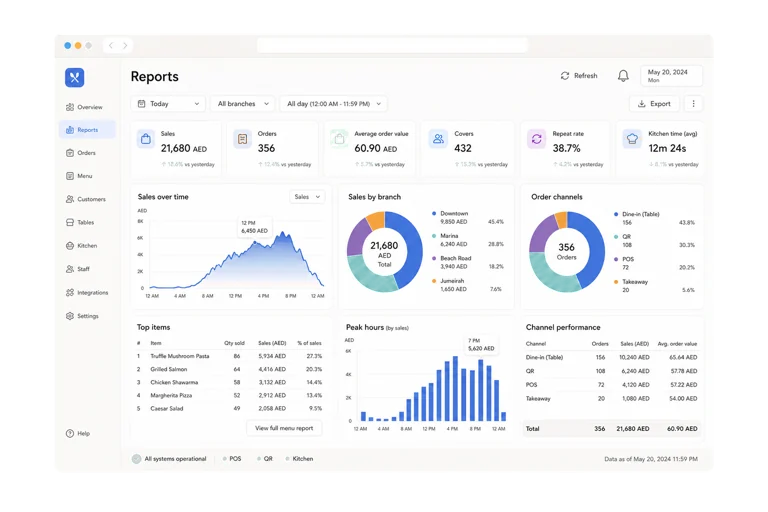
Add each branch under one account and switch between them from the header. Menus are shared, while prices, availability, hours, stock and staff can differ per branch, and the reports can be filtered by branch or seen together.

Can each branch have its own prices?

Yes. A product can have a branch price, and the same goes for combos and paid options. A branch that sells in a different currency sells only the items that have their own price for that branch.

What can the AI assistant do?

It answers questions about your live business, opens the right screen, drafts discounts and promotions from a description, adjusts stock, looks up gift cards and purchase orders, and suggests product descriptions. Every change it proposes waits for your confirmation.

Can I turn on two step sign in?

Yes. Accounts can use two step sign in and passkeys, you can see trusted devices and sign them out, and security alert emails tell you about sensitive changes to your account.

Can I see who changed what?

Yes. Sensitive actions across the back office, such as voids, refunds, price changes and permission changes, are written to an activity record with the person’s name and the time, and void and refund alerts can be emailed to the owner.

Ready to see how it works?

Contact us and we will show you a demo that fits your restaurant or shop. No commitment.

Contact

Tell us what you run

Send a message or reach us on WhatsApp. We will show you the right setup for your restaurant or your store.